








nowthy

Press kit

Logos, app icons, screenshots and videos, for anyone writing about nowthy, Petit Fire, Petit Sky or Callulu. Download what you need; you do not have to ask first.

Screenshots and video

The App Store screenshots of each app. Petit Fire and Callulu also have a short silent video.

  • A Petit Fire screenshot: the menu open at the top right of a dark Mac screen, with a warm light in the bottom right corner.

    Petit Fire

    4 screenshots, 2880 × 1800 (ZIP, 7.1 MB).
    Video, 1280 × 800, 22 seconds (MP4, 1.2 MB).

    Screenshots Video

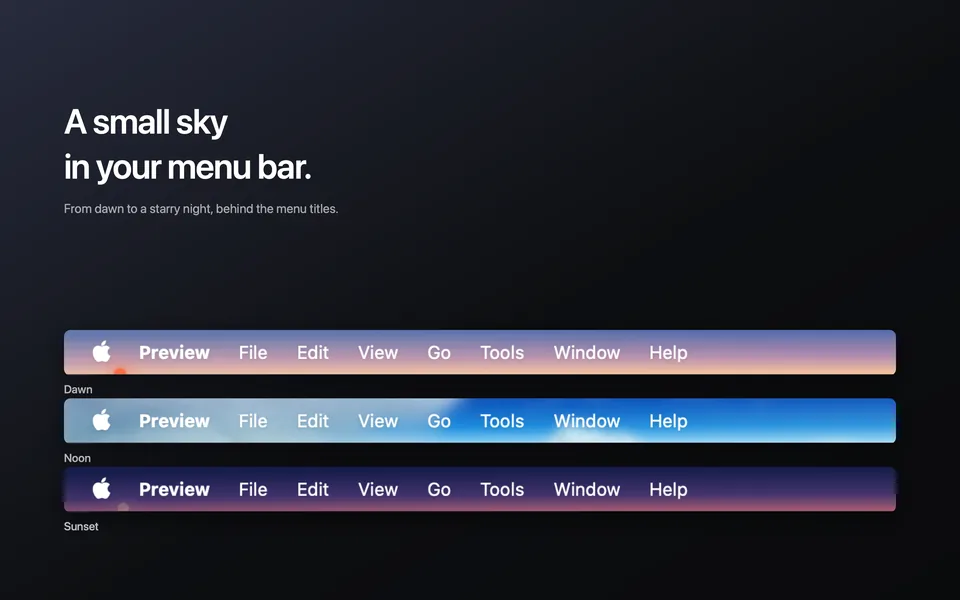
  • A Petit Sky screenshot: three Mac menu bars with the sky behind the menu titles, at dawn, noon and sunset.

    Petit Sky

    5 screenshots, 2880 × 1800 (ZIP, 2.2 MB).

    Screenshots

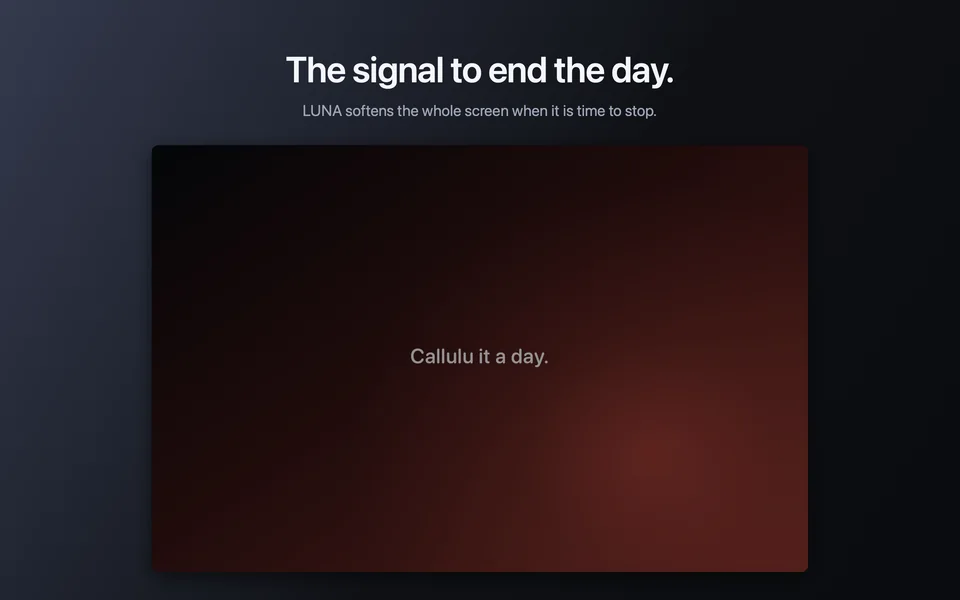
  • A Callulu screenshot: LUNA softening the screen, with the words “Callulu it a day.” in the middle.

    Callulu

    4 screenshots, 2880 × 1800 (ZIP, 14.7 MB).
    Video, 1280 × 800, 23 seconds (MP4, 2.3 MB).

    Screenshots Video

Petit Fire, in short

Written to be quoted. Copy any of it.

English

Petit Sky puts a sky behind the Mac menu bar. With Current time on, the sun and the moon appear where you would actually see them in the Mac's time zone. Turn it off, and you choose the time and the weather yourself. At night, 2,068 real stars from the Yale Bright Star Catalogue spread out in their real places, and the moon keeps its phase and its face. The clouds are cut from time-lapse film of a real sky. The band behind the menu titles is kept clear, so the text stays readable.

Like a window above the desktop, it lets you feel the sky change over the day, even in a study or a meeting room with no window. Turn on Current weather and the sky syncs with the weather where you are (from Apple Weather, at most once an hour). Turn on Sound and you hear the weather too: a breeze, rain or a thunderstorm.

Released
14 September 2026, on the Mac App Store.
Price
Free. Tips inside the app, if you want to leave one.
Runs on
macOS 14 or later. Apple silicon and Intel.
Data
Settings stay on this Mac.
Settings
Brightness, size, place, volume, sound.
Sound
A wooden wick, from a public domain recording. Never sounds like a loop.
Made by
nowthy, one person, in Japan.
App Store
apps.apple.com/app/petit-fire/id6809895649
Pages
nowthy.com/petitfire
How it was made
nowthy.com/articles/drawing-candlelight-on-a-mac-screen
Contact
support@nowthy.com

日本語

Petit Sky は、Mac のメニューバーに空を映すアプリです。「現在時刻」がオンなら、Mac のタイムゾーンで実際に見える位置に太陽と月が表示されます。オフにすれば、時刻も天気も自分で選べます。夜にはイェール輝星星表の 2,068 個の実在の星が本物と同じ並びで広がり、月も満ち欠けと向きを保ちます。雲は、実際の空を撮ったタイムラプス映像から切り出しています。メニューの題の後ろの帯は空けてあるので、文字はそのまま読めます。

デスクトップの上にある窓のように、窓のない書斎や会議室でも、一日のうちに空が移り変わっていくのを感じることができます。さらに「現在の天気」をオンにすると、空が現在地の天気と同期します(Apple Weather から1時間に1回まで)。「サウンド」をオンにすると、天気に合わせて風や雨、雷雨の音も鳴ります。

公開日
2026年9月15日(Mac App Store)
価格
無料。アプリの中に、応援のためのチップがあります。
動作環境
macOS 14 以降。Apple シリコンと Intel。
データ
設定はこの Mac の中に残ります。
設定
明るさ・大きさ・場所・音量・サウンド。
音
木芯キャンドルの実際の録音(パブリックドメイン)。繰り返しには聞こえません。
作り手
nowthy(個人・日本)
App Store
apps.apple.com/jp/app/petit-fire/id6809895649
ページ
nowthy.com/ja/petitfire
作りの話
zenn.dev/nowthy/articles/ddca281907d717
連絡先
support@nowthy.com

Petit Sky, in short

Same as above. Quote any of it.

English

Petit Sky puts a sky behind the Mac menu bar. With Current time on, the sun and the moon are where they are right now for the Mac's time zone; turn it off and any hour can be chosen, and so can the weather. The night holds 2,068 real stars from the Yale Bright Star Catalogue in their real places, the moon keeps its phase and its face, and the clouds, cut from time-lapse film of a real sky, drift across. The menu titles stay readable: the band behind them is kept clear.

It is a window above the work. At a desk with a window, the light changes over the day and you notice it in glances. The menu bar is the one strip of the screen that is always there and rarely looked at, which makes it the right place for a sky. Turn on Current weather and the sky syncs with the weather where you are, from Apple Weather, at most once an hour. Turn on Sound and you hear the weather too: a breeze, rain or a thunderstorm.

Released
1 October 2026, on the Mac App Store.
Price
Free. Tips inside the app, if you want to leave one.
Runs on
macOS 26 or later, with Show menu bar background off (the default). Apple silicon and Intel.
Data
Settings stay on this Mac. Location is used only if Current weather is on, rounded to about ten kilometres, and sent to Apple Weather and nowhere else.
Menu
Sun and Moon, Current time, Running, Current weather, Time, Time of day, Weather, Volume, Sound, Open at login.
Weathers
Clear, fair, cloudy, rain, snow, thunder.
Made by
nowthy, one person, in Japan.
App Store
apps.apple.com/app/petit-sky/id6815887215
Pages
nowthy.com/petitsky
How it was made
nowthy.com/articles/drawing-the-sky-of-the-hour-in-a-mac-menu-bar
Contact
support@nowthy.com

日本語

Petit Sky は、Mac のメニューバーに空を映すアプリです。「現在時刻」がオンなら、Mac のタイムゾーンで実際に見える位置に太陽と月が表示されます。オフにすれば、時刻も天気も自分で選べます。夜にはイェール輝星星表の 2,068 個の実在の星が本物と同じ並びで広がります。月は満ち欠けと向きを保ちます。雲は、実際の空を撮ったタイムラプス映像から切り出しています。メニューの題の後ろの帯は空けてあるので、文字はそのまま読めます。

仕事の上にある窓のようなものです。窓のある机では、一日のうちに光が変わっていくのを、合間の一瞥で気づきます。メニューバーは、画面でいちばんいつも見えていて、いちばん見られていない帯です。そこに空を置きました。「現在の天気」をオンにすると、空が現在地の天気と同期します(Apple Weather から1時間に1回まで)。「サウンド」をオンにすると、天気に合わせて風や雨、雷雨の音も鳴ります。

公開日
2026年10月1日(Mac App Store)
価格
無料。アプリの中に、応援のためのチップがあります。
動作環境
macOS 26 以降。「メニューバーの背景を表示」がオフ(初期設定)のとき、空が見えます。Apple シリコンと Intel。
データ
設定はこの Mac の中に残ります。位置情報は「現在の天気」をオンにしたときだけ、約10kmに丸めて Apple Weather にだけ送ります。
メニュー
太陽と月・現在時刻・進行中・現在の天気・時刻・時間帯・天気・音量・サウンド・ログイン時に開く。
天気
快晴・晴れ・曇り・雨・雪・雷。
作り手
nowthy(個人・日本)
App Store
apps.apple.com/jp/app/petit-sky/id6815887215
ページ
nowthy.com/ja/petitsky
作りの話
nowthy.com/ja/articles/drawing-the-sky-of-the-hour-in-a-mac-menu-bar
連絡先
support@nowthy.com

Callulu, in short

Same as above. Quote any of it.

English

Callulu sits in the Mac menu bar and draws eight visual cues over the screen. Some pass in a moment: a flash to mark the start of work, a water surface to come back to calm, a breathing guide. Others stay until you turn them off: the one that darkens everything around the middle of the screen, the quiet light at the edge that keeps you company, the softening of the whole screen at the end of the day.

Each cue has one job, shown under its name in the menu. LIGHTNING to begin. SHADE to focus. WISP to catch you when you have gone too far into something. EMBER to feel safe. UNDINE to regain composure. LULL to step back. SYLPH to reset your breathing. LUNA to finish.

Price
Free, both editions. In the Mac App Store edition, About Callulu has two tips, a cup of coffee and a bag of coffee. Buying one changes nothing inside the app.
Editions
The direct edition runs cues from the keyboard, and the keyboard backlight follows them.
Runs on
macOS 13 or later. Apple silicon and Intel.
Data
Settings stay on this Mac.
Settings
Effect strength, where a cue appears, accent color, sound, start at login.
Made by
nowthy, one person, in Japan.
App Store
apps.apple.com/app/callulu/id6808433006
Pages
nowthy.com/callulu
How it was made
nowthy.com/articles/eight-cues-for-staying-myself
Contact
support@nowthy.com

日本語

Callulu は Mac のメニューバーに常駐して、画面に8つのサインを出すアプリです。 一瞬で通り過ぎるものと、消すまで出ているものがあります。 始まりを示す一瞬の光や、落ち着きを取り戻すための水面は前者。 画面の中央だけを残して周りを暗くするサインや、一日の終わりに画面全体をやわらげるサインは後者です。

サインはひとつずつ役割を持っていて、メニューでは名前の下にその役割が出ます。 始めるときの LIGHTNING、集中するための SHADE、入り込みすぎたときに気づかせる WISP、 長い作業に付き添う EMBER、落ち着きを取り戻す UNDINE、一歩離れて見るための LULL、 呼吸を整える SYLPH、終わりにする LUNA。

価格
どちらの版も無料。Mac App Store 版では、「Callulu について」の中にチップが2つあります(コーヒーを1杯、コーヒーを1袋)。買っても中身は変わりません。
2つの版
直販版はキーボードからサインを出せて、バックライトも連動します。
動作環境
macOS 13 以降。Apple シリコンと Intel。
データ
設定はこの Mac の中に残ります。
設定
効果の強さ・表示位置・色・音・ログイン時に開く。
作り手
nowthy(個人・日本)
App Store
apps.apple.com/jp/app/callulu/id6808433006
ページ
nowthy.com/ja/callulu
作りの話
zenn.dev/nowthy/articles/36441ff12acedc
連絡先
support@nowthy.com

Using them

  • Keep the colors and shapes as they are.
  • Leave some space around them.
  • The two logos are drawn for light backgrounds.

For anything else, write to support@nowthy.com.