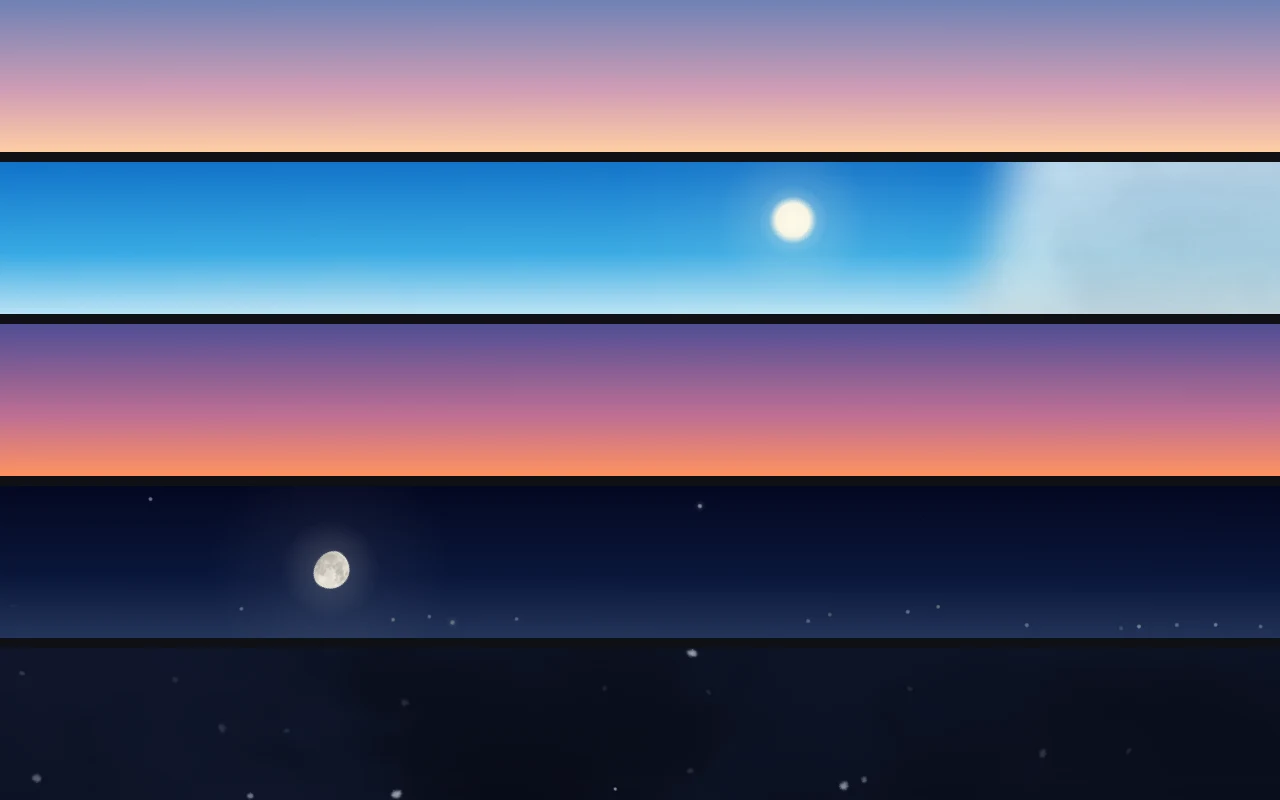
There is one strip of a Mac screen that is always on view and almost never looked at. The menu bar sits across the top of everything, holds the clock and a few icons, and stays where it is while windows come and go underneath. It is the same strip a window would occupy on a desk with a view: a narrow band of sky above the work. Petit Sky is the app that puts a sky there. This note is about what is real in that sky, what is made up, and the few decisions that shaped it.
Why the top of the screen
A desk beside a window changes over the day without anyone deciding to watch it. The light on the wall goes from grey to blue to amber and then goes out, and you notice it in glances, between other things. That is the whole intent: a sky you catch sight of, not one you sit and stare at. The menu bar is the right size for that. It is about thirty points tall on a laptop, it spans the full width, and nothing you do to your windows can cover it.
The app draws behind the menu bar rather than on top of it. macOS renders the menu titles, the clock and the status icons as it always does, and the sky sits in the translucent band underneath. Click the icon and the sky shows or hides. Right-click it and a menu opens with the rest, including the hour itself: with Current time off, the slider or four buttons (morning, noon, evening, night) choose the sky, and it runs on from there at the pace of the clock. Turn Running off and it stays put.
Real stars, in their places
The first version of the night sky used random dots, and it looked like a screensaver. Random dots have no memory. The dot that sat above the clock last night is somewhere else tonight, and the sky reads as decoration.
The stars now come from the Yale Bright Star Catalogue: 2,068 of them, with their catalogue positions and magnitudes. For the Mac's time zone the app takes a representative city (Asia/Tokyo gives Tokyo, for example), computes where each star is in that city's sky at this hour, and projects the visible half of the sphere onto the strip. Brighter catalogue stars are drawn brighter. Vega is where Vega is, and it will be there again tomorrow, four minutes earlier, the way the real one is.
None of this needs a location or a network. A clock and a time zone are enough to place the sun, the moon and the stars.
Size was the surprising decision. The stars looked small, and the obvious fix was to draw them larger. A trial at twice the size turned every point into a soft disc, and the faint ones became hard to tell from snow. A real star has no visible size at all; the bright ones only look bigger because their light spreads in the eye. So the stars stayed the size they were and became brighter instead, with the brightest capped so they still read as points. The brightness comes from the catalogue, so the order of the sky is the catalogue's order.
A moon with the right face
The moon keeps its phase and its orientation. The lit side faces the sun, as it does outside, and the disc is shaded with a real map of the lunar surface, so the dark seas are where you would expect them. Low over the horizon it turns yellow and then orange-red, high in the sky it goes white. When a thick cloud passes, the disc and its glow go behind it. When a thin one passes, the light comes through.
At night, every seven minutes or so on average, a meteor crosses the upper band. Never within three minutes of the last, and only once the sky is dark enough for the stars to be clearly visible. It is a small thing and most of them will be missed, which is how meteors work.
Clouds from real footage
Clouds were the hardest part. The first ones were procedural: shapes cut from a field of noise, with 1/f fluctuation in where they gathered and how they moved. From a distance they passed. The moment a shape became distinct, it looked made. Softer edges, a shapeless veil, finer or coarser texture: each attempt failed at the same point.
So the clouds changed at the source. They are now thin strips cut from two time-lapse films of a real sky, one for fair weather and one for overcast, both published on Pexels. The app keeps only how dense each part of a cloud is and how bright, and paints it in the colours of the hour and the weather: tinted at dawn and dusk, dark against the night. The shapes and the way they break apart are as they were filmed, so the edges fade the way real edges do. The strips loop, about every five minutes for fair weather and every three for overcast, and each seam is dissolved slowly.
Rain and snow fall as individual drops and flakes, each one timed from the moment it enters the strip, so a gust moves the drops that are already falling and leaves the ones that have not started yet. Thunder is one soft flash about once a minute, and it is suppressed when macOS is set to reduce motion or to dim flashing lights.
There is sound too, off until you turn it on: a light breeze for clear and cloudy skies, rain for rain, heavier rain for a thunderstorm, and thunder a few seconds after each flash. The recordings come from Freesound, all released under CC0.
Keeping the words readable
A sky behind text has one job it must not fail at: the text has to stay legible at noon and at midnight. The middle eighteen points of the bar, where the menu titles sit, are kept clear of stars, of the clouds in front, and of rain and snow. Those show up in the edges above and below the text. The sky's colour still runs the full height, so the strip reads as one sky rather than three stripes, and the menu titles read as they always have.
Fog used to be one of the weathers. It only whitened the bar, and its icon in the menu was too small to read, so it went. The six that remain are clear, fair, cloudy, rain, snow and thunder. You can pick one, or turn on Current weather to sync with the weather where you are: it asks Apple Weather at most once an hour, only while the sky is on screen, with a location rounded to about ten kilometres, and it stops asking the moment you choose a weather by hand or turn the switch off.
What it is for
Petit Sky is the second of two small apps for the Mac menu bar. Petit Fire puts a candle at the edge of the screen; Petit Sky puts the sky along the top of it. Neither asks for anything back. The sky matches the clock, the stars are the real ones, and the menu bar itself does not change. If you look up from the work and the light has changed, that is the app doing its job.