Before I knew it, I could no longer control myself, and each time it happened I felt regret, and I thought less of myself. A small worry along those lines is why I decided to make an app for staying who I am.
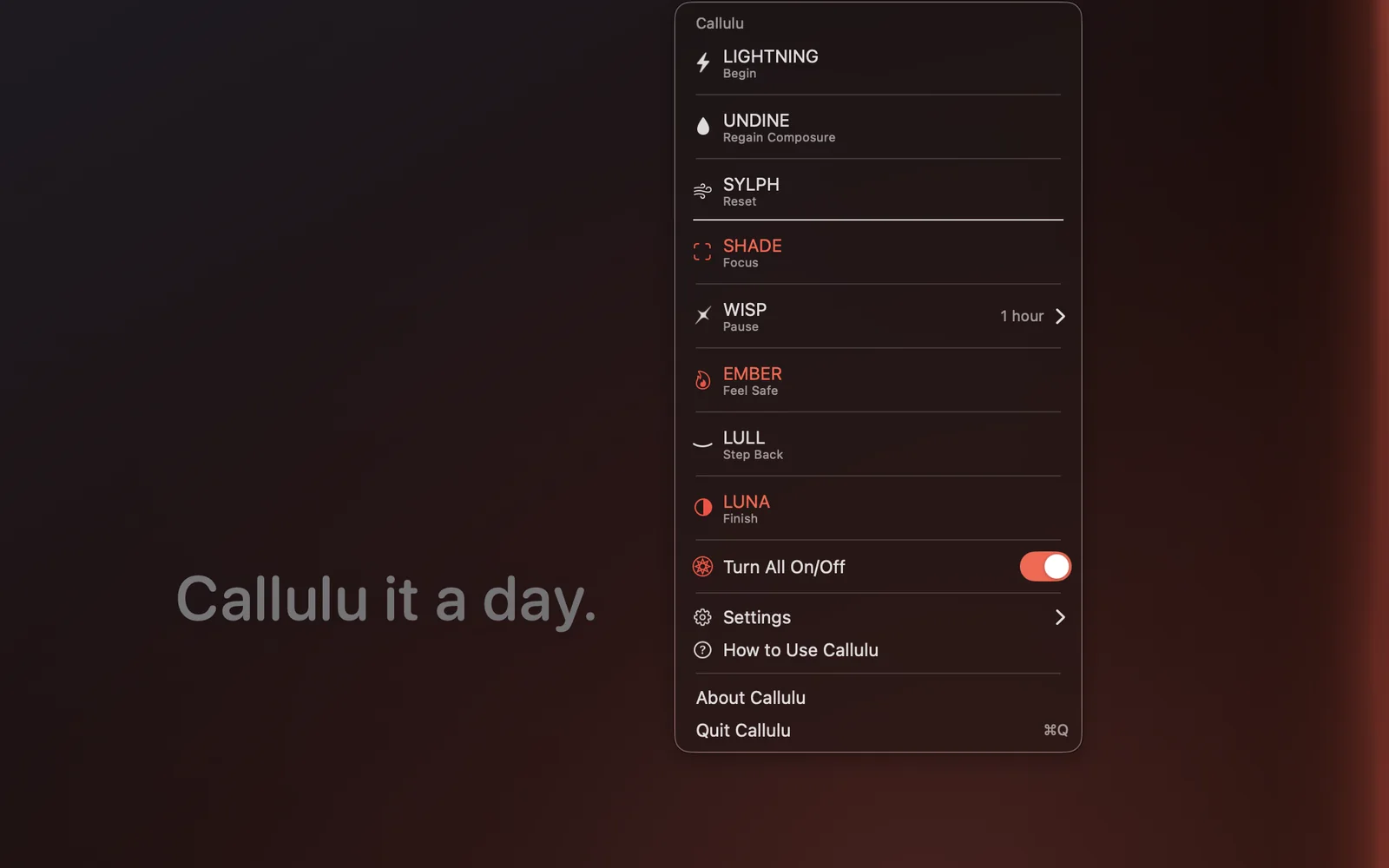
It became Callulu, a Mac menu bar app with eight visual cues. Begin, focus, pause, feel safe, regain composure, step back, reset, finish. Each cue has one job, shown under its name in the menu, because the names (LIGHTNING, SHADE, WISP, EMBER, UNDINE, LULL, SYLPH, LUNA) do not say it.
These are notes on making it: what I decided not to draw, what I had wrong, and what it is for at the end of the day.
Why the bolt is never drawn
LIGHTNING is the cue for beginning, and it lights the screen for a moment. I drew a bolt at first, then took it out. The shape only ever read as an illustration sitting on top of the work. When lightning really goes off outside the window, what reaches you is less the shape than the change: the room is brighter for an instant, and then it is not.
So the shape went away, and what is left is two cool, uneven washes of light. The first peak lands at 52 milliseconds, the dark interval at 105, the second peak at 205, and the whole event is finished at 720.
Keeping the flash to two in a second
Some people are sensitive to flashing light, and the line usually drawn is to avoid three or more flashes inside any one second.
One press gives two peaks, so a single flash sits inside that line. The risk was in repeats: key repeat, a callback firing twice, a notification arriving more than once. An accepted flash now starts a cooldown of 1.35 seconds, and requests inside it are dropped, so any one second window holds two completed flashes at most.
With the system setting for reduced motion on, the same cue becomes a gentler single pulse of 520 milliseconds. LIGHTNING flashes only when you run it, whether from the menu, a callulu:// link, or the keyboard shortcut in the direct edition, and it never starts on its own.
The keyboard backlight follows the same timeline
On a MacBook, the keyboard backlight moves with the flash, at 52, 105 and 205 milliseconds, with the restore at 340. That part ships in the direct edition only, and the path behind it is careful, because the API is private.
The framework, the class, the selector and the keyboard itself are resolved at run time, and if any of them is missing the controller stops there, with no warning and no permission prompt. Before writing anything it snapshots each keyboard's brightness and automatic brightness flag, suspends automatic brightness for the pulse, and puts both back on every exit path: the pulse completing, another press, the master switch, sleep, quit.
Building for the sandbox
All eight cues are in both editions, and they draw the same way. The App Store edition runs in the sandbox, where a private API and a global event tap have no place, so two things are compiled out of that build: the keyboard backlight sync, and the path that calls cues from a double tap or a long press of Shift.
Leaving them out by hand would eventually go wrong, so the build script inspects the binary it has just produced, and fails if strings such as the private framework's name, dlopen or CGEventTapCreate are still in there. Measured before submission, the six occurrences of the framework name in the direct build were zero in the store build. What differs between the editions is how a cue can be called.
Clicks pass through, and every cue has its own height
Each cue draws into a transparent window the size of the screen, with four settings shared: ignoresMouseEvents, so clicks land in the window underneath; canJoinAllSpaces, so the cue is there on every Space; fullScreenAuxiliary, so it draws over full screen apps; and stationary with ignoresCycle, so it stays out of Mission Control and window switching.
The window level is then chosen per cue. SHADE sits one below the main menu, so its dark top strip becomes the menu bar's backdrop instead of covering the controls. LUNA sits at the status bar level, WISP and EMBER one above it, since a brief cue should be visible while LUNA is on, and LIGHTNING four above, so the flash carries past the menu bar without reaching screen saver territory.
Nothing on screen is remembered
No cue stores the fact that it was showing, so the app opens with a clear screen every time. Restoring a dimmed screen from last time would hand you a dark display with no visible cause. Settings are kept: color, strength, edge, interval. What is drawn is not.
Reduce motion, and the one cue that keeps moving
Going through the app for accessibility before release, I found that six of the eight cues never looked at the reduced motion setting, which did not hold together for an app whose own listing warns people about light.
The decision now lives in one place and seven cues follow it. One is a deliberate exception. SYLPH guides a deep breath, and the widening and narrowing is the cue itself, so stopping it leaves a lit rectangle that guides nothing. The setting is there to cut movement that bothers people rather than to take a feature away, and SYLPH runs only when you ask for it. LUNA likewise keeps its 45 minute fall in brightness and shortens only the fade at each end.
One small detail came out of that work. The shortened duration is one millisecond rather than zero. Passing zero to NSAnimationContext is not always treated as an immediate completion, and the order of the completion handlers can change with it.
Callulu it a day
Enough about the build. At the end of the day I run LUNA. The screen steps down at once, then keeps deepening for 45 minutes, and the words Callulu it a day come up on it. Give it a time and it starts on its own.
It works like pulling a shutter down, and once the screen is on its way out, leaving the desk is easy. That line is where the name landed: there is an English phrase for stopping work, call it a day.
LIGHTNING opens the day and LUNA closes it. WISP is the one I do not call: a light passes along one edge at the interval I set, and I use it as a reminder to move. When it runs I stand up and do squats, and somewhere public I take a few deep breaths instead.
Where Callulu runs
macOS 13 or later, on Apple silicon and Intel. The cues that stay on have a switch of their own, the other three appear only when you run them, and one switch at the top of the menu stops all eight.
Most tools for self control begin by measuring you, and what comes back is a number for the days you did not manage it. Callulu starts at the other end of that. When you decide to begin, and when you decide to finish, it puts a mark on the screen. I wanted the deciding to stay with me.